
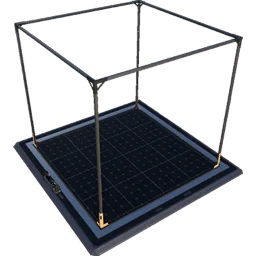
Blueprints are reusable building groups designed inside a Blueprint Designer and then placed as a whole. Their size limit is the designer's build volume.
Designers
| Designer | Build volume | Building size | Unlock |
|---|---|---|---|
 Blueprint Designer Mk.1 Blueprint Designer Mk.1 |
32 × 32 × 32 m (4 × 4 × 4 foundations) | 40 × 40 × 34 m | Tier 4 – FICSIT Blueprints |
 Blueprint Designer Mk.2 Blueprint Designer Mk.2 |
40 × 40 × 40 m (5³) | 48 × 48 × 42 m | Tier 6 – FICSIT Blueprints Mk.2 |
| Blueprint Designer Mk.3 | 48 × 48 × 48 m (6³) | 56 × 56 × 50 m | Tier 9 – FICSIT Blueprints Mk.3 |
- Not placeable in any designer: HUB, Space Elevator, Miners, Water/Oil Extractors, Resource Well Pressurizer and Extractors, Geothermal Generator. Mk.3 only: Quantum Encoder, Nuclear Power Plant. From Mk.2: Particle Accelerator, Alien Power Augmenter (it expands), Train Station, Freight / Fluid Freight Platform, Empty Platform. Vehicle Paths (1.2) and Railways are allowed.
- A blueprint stays bound to its designer mark: a Mk.1 blueprint can be inserted into a Mk.2/3 designer, not the other way round; editing only in the same mark.
- Snapping: 1 m horizontally / 0.5 m vertically on loose foundations; blueprint mode snaps blueprint to blueprint (centre). Auto-Connect (R, since 1.1) joins belts, pipes, railways and vehicle paths up to 16 m (2 foundations) and prefers the best-aligned connection. The front is the Control Bench. To stay on the world grid, first place loose foundations on the grid, then snap blueprints to them.
- Dismantling: the blueprint dismantle mode selects the whole blueprint (linked IDs), not belts added later. The storage box at the Control Bench collects materials when dismantling inside the designer.
Files
On PC a blueprint is an .sbp file (layout, shareable) plus .sbpcfg (description, icon) in the session folder %LOCALAPPDATA%\FactoryGame\Saved\SaveGames\blueprints\{SESSION} – not cloud-synced; reload the save after copying files in. Categories are stored in the save. Names sort alphabetically (use z001 instead of z1); no Windows special characters. Removing a blueprint deletes the file irrevocably. On consoles blueprints live inside the save.
Designing good blueprints
- Design around the belt capacity and the classic ratios: a 4 × 4 foundation cube fits e.g. 8 Smelters + 8 Constructors for a full Mk.2 belt of ore, or 4 Foundries + 3 Steel Beam Constructors.
- Leave the input and output belts ending on the blueprint boundary so Auto-Connect can join adjacent copies.
- Keep manifolds inside the blueprint; feed several copies with one belt per row.
In this planner a Module plays the same role as a blueprint: a nested sub-graph with Input/Output ports that you can reuse – see Using SatisfactoryBase.